AI for Healthcare and Wellness

Explore Indian healthcare and wellness AI examples. Plan appointment help and service information while professionals handle care decisions.

Friendly AzentiKo assistant waving hello

A useful starting point for Indian businesses

Where Can AI Help Your Team?

Healthcare teams may use AI to share approved service information, collect appointment requests and explain preparation steps. Symptoms, diagnosis, treatment, emergency care and personal records need qualified clinical and privacy processes.

Healthcare teams use AI to sort information, support research and reduce routine work. Patient safety comes first: clinical decisions, diagnosis and treatment remain with qualified professionals.

Explore Live Demo Options
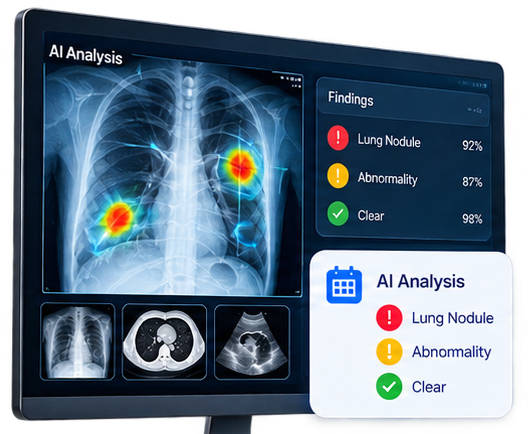
Illustrative healthcare research and professional-review artwork
Illustrative industry artwork from our local assets. Not a customer deployment or proof of a product feature.

Learn from published work and clear ideas

Company Examples, Explained Simply

These names come from the supplied Indian enterprise reference. Published examples link to official company, technology-provider or public-service sources. Unconfirmed claims are labelled separately. None is an AzentiKo customer, partner or endorsement.

Reviewed . A historical publication does not confirm a service’s current availability or performance.

Qure.ai logo

Qure.ai

Published AI example

Qure.ai presents qXR as AI software for chest X-ray interpretation assistance and clinical workflow support. It helps trained healthcare professionals review findings; it is not a general chatbot diagnosis or a promise of a correct result for every patient.

What a Smaller Business Can Learn

A healthcare organisation can use AI to prioritise work and prepare a draft view for review. The safe pattern is clear escalation, audit trails and a clinician’s final decision—not an automated diagnosis sent directly to a patient.

Official product and documentation reviewed; use is described as assistance, not replacement.

Qure.ai qXR (opens in a new tab)
HealthifyMe logo

HealthifyMe

Published AI example

HealthifyMe presents Ria as an AI nutrition and lifestyle coach that answers food and fitness questions, supports personalised suggestions and can use food-photo tracking. The official product page positions Ria as wellness coaching, not medical diagnosis.

What a Smaller Business Can Learn

A wellness business can answer common food and habit questions, remember a user’s stated goal and suggest the next small action. Health conditions, medicines and serious symptoms should be sent to a qualified professional.

Official HealthifyMe product page opened; no clinical-diagnosis claim is made.

HealthifyMe Ria AI coach (opens in a new tab)
Practo logo

Practo

Industry idea — AI claim not confirmed

Practo provides online healthcare discovery, appointment and consultation services. The public pages reviewed did not identify a named AI scheduling or symptom-to-specialist product matching the attachment.

What a Smaller Business Can Learn

A care provider can use an assistant to collect the reason for contact, show available departments and help with appointment steps. It should always make clear that triage information is not a diagnosis.

Attachment claim not confirmed through an official named AI source.

Practo (opens in a new tab)
Tata Memorial Centre logo

Tata Memorial Centre

Published AI example

A Government of India update in August 2025 describes Tata Memorial Centre’s collaboration with Wipro GE Healthcare to develop and validate AI applications for medical imaging and cancer-care workflows. This is a research and development example, not proof that AI independently diagnoses patients in routine care.

What a Smaller Business Can Learn

Hospitals can use carefully governed tools to organise records, research and imaging worklists while clinicians retain responsibility. Any model must be evaluated for the intended population and monitored for missed or incorrect results.

Official government research update. Development plans and proposed studies are not routine clinical results.

PIB: Promotion of Cancer Research and Innovation, August 2025 (opens in a new tab)

SigTuple

Published AI example

SigTuple describes AI-enabled digital pathology and diagnostic systems that help process and review laboratory samples. Its public material presents automation and decision support for healthcare workflows, with clinical oversight and validation remaining important.

What a Smaller Business Can Learn

A laboratory can reduce manual repetitive work by turning sample images into a reviewable digital worklist. Staff should check quality, review flagged cases and keep a clear record of how the result was approved.

Official company product positioning reviewed; exact customer deployments are not assumed.

SigTuple healthcare AI (opens in a new tab)

Ideas you can plan with your team

Start With Everyday Customer Questions

These are illustrative workflows, not verified AzentiKo capabilities or measured customer results. Confirm the feature, data access and connection before implementing one.

Appointment request

A clinic assistant shares departments, opening times and preparation notes, then records an appointment request for staff to confirm.

A customer may ask
Which department should I contact?

Visit preparation

A diagnostic centre assistant explains a published fasting or document instruction and asks the centre team to handle exceptions.

A customer may ask
How should I prepare for this test?

Service navigation

A wellness business assistant explains available programmes and sends personal health questions to a qualified practitioner.

A customer may ask
Which service may be suitable for my goal?

A Practical Business Scenario

A clinic can use an assistant for appointment questions, preparation instructions, department routing and follow-up reminders. It can collect a patient’s request and send it to staff. It must not diagnose, prescribe or create false confidence, and sensitive health information needs strong access and privacy controls.
A small, sensible first step

Plan It. Test It. Then Decide.

Make the first workflow easy to check. Keep one person responsible for the information and the next action.

  1. Use reviewed content

    Approve every public answer with the responsible clinical or service owner.

  2. Protect sensitive data

    Collect the minimum information and use the approved patient or booking system.

  3. Add emergency guidance

    Tell users to contact local emergency services for urgent symptoms; do not delay care.

  4. Escalate health questions

    Send symptoms, diagnosis and treatment questions to qualified professionals.

  5. Check accessibility

    Use plain language, clear next steps and a non-chat contact route for every service.

Keep the Limits Clear

AzentiKo is not a medical device, diagnostic tool, emergency service, doctor or patient-record system. It must not diagnose, prescribe or make clinical decisions.

AI may assist a professional workflow, but it must not replace a clinician or provide diagnostic certainty. Follow applicable medical, privacy and consent requirements.

Check AzentiKo Features and LimitsPlan Your Data Connections

Common Questions Before You Start

Can AI diagnose symptoms?

No. A website assistant should not diagnose, prescribe or reassure a person about a serious symptom. It should direct them to qualified care.

Can it book an appointment?

It can collect a request if the approved booking process supports it. A clinic should confirm the time and patient details.

What about wellness advice?

Keep general information clearly labelled and send personal health questions to a qualified practitioner.

What should clinics publish first?

Start with departments, timings, preparation instructions and contact routes. Keep medical answers outside the assistant’s scope.

Your next step

Bring Your Questions.
See What Could Work for Your Business.

Explore the examples or request a guided walkthrough. Our team can help you check the plan, setup and tools you need.

A demo request opens your email app. Your team and ours will agree the next steps.